
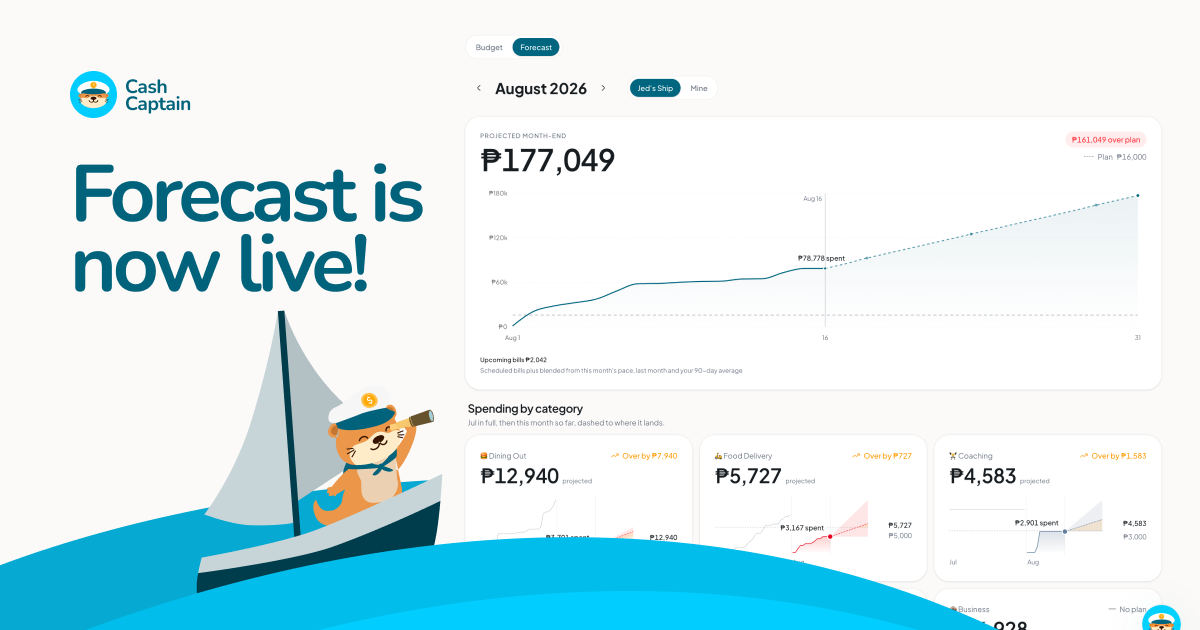
Spending Forecast on Budget
Forecast is on the budget tab for everyone now. Remaining spend, the days your bills hit, category cards that show whether you're on pace.
Design polish
Web and iPhone look closer to one product this week: type, icons, pickers, native keypads, and a few numbers that tick instead of jumping.
More institution logos
GrabPay, ShopeePay, Wise, PayPal, PalawanPay, Airwallex, brokers, and crypto wallets now get real logos when you name the account.
Navigation bar on older iPhones
If you're still on iOS 18, the navigation bar now fits the rest of the app.
Filter transactions by account
On iPhone, you can filter the register to one account.
New category from Quick Entry
You can create a category while you log, without leaving Quick Entry.
Added 3 more icons
Pag-IBIG, MP2, and SSS accounts now have proper institution icons.
Thousand separators on amounts
iPhone amount fields format with commas as you type, the way you would write them.
Amounts look consistent
iPhone money amounts show the same decimals everywhere, so they don't look messy next to each other.
Accounts and net worth stay current
Log a transaction and both update across the app. No stale numbers, and you shouldn't need to refresh.
Home opens faster
If you already have an account, iPhone goes straight to your money instead of a loading flash or Welcome.
Native Recurring
Bills and income on iPhone: list, calendar, record, skip. You can set a repeat from Quick Entry. No bounce back to web.
Searchable emoji picker
Category and group icons have a searchable emoji picker. Type a name, pick a glyph.
Past-due recurring grouped
Overdue recurring periods sit together instead of mixing into the rest of the list.
Account icons in dropdowns
Account menus show the logo or emoji, grow for long names, and keep the highlight on the selected row.
Category names survive account filters
Filtering the register by account no longer blanks out category names on the rows.
Goals list on iPhone
Goals match the web list: progress, funding, less ownership chrome in the way. Liquid Glass on the top bar.
Insights filters stick
Period and account filters on iPhone apply across widgets, including ones that used to ignore them. Infinite scroll and read-only transaction rows landed with it.